Hunting for Service Executable Hijacking
December 13, 2023
Prologue
In a recent Red Team engagement my organization had, the penetration testers managed to laterally move to a Windows endpoint; since they didn’t have admin privileges on it, they were looking for ways to escalate their privileges. Luckily (for them), they found a service with insecure permissions that ran under the context of NT Authority\SYSTEM – and exploited it, gaining that level of privilege on that host.
When I read the PT report, I was annoyed; was it pure luck they got to a host that was vulnerable to this misconfiguration, or was it a game of probabilities (well, that’s true in many cases, I guess)?
And if so – what is the percentage of hosts which are also vulnerable to this type of hijacking? 5%? 50%?
In this blog post, we will explore Windows Service Executable Hijacking from both a Red Team (adversarial) and a Blue Team (defender) perspective. We’ll discuss how Red Team operators exploit this attack and provide practical advice for Blue Teams on how to detect and mitigate this threat.
Understanding Windows Service Executable Hijacking
Let’s start with the Red Team perspective, and understand the attack technique: Windows services are background processes managed by the Service Control Manager (SCM), making them attractive targets for exploitation. Each service points to an executable file on disk, which holds the code and logic of what the service actually does.
Let’s look at the following example:
Running the command “Services.msc” opens up the “Services” view, where one of the listed services is Sysmon.
 Sysmon is running as “Local System” (meaning high-level privileges).
Right-clicking on it and choosing “Properties” displays information regarding the service, in particular – the path of the executable it’s running.
Sysmon is running as “Local System” (meaning high-level privileges).
Right-clicking on it and choosing “Properties” displays information regarding the service, in particular – the path of the executable it’s running.
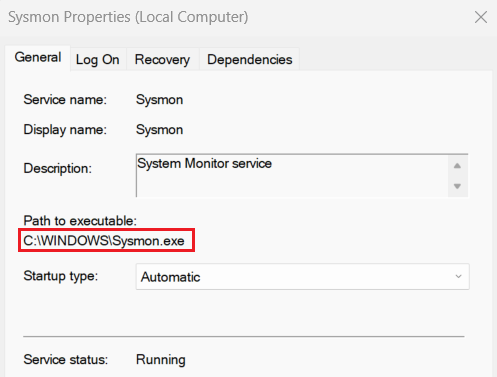
Windows service executable hijacking involves replacing the legitimate executable file of a Windows service with a malicious counterpart. This can be achieved if the folder that file is located in (or even just the file itself) has weak ACL permissions, allowing an attacker to manipulate it without arousing suspicion.
In our example – the service executable has the following security permissions –
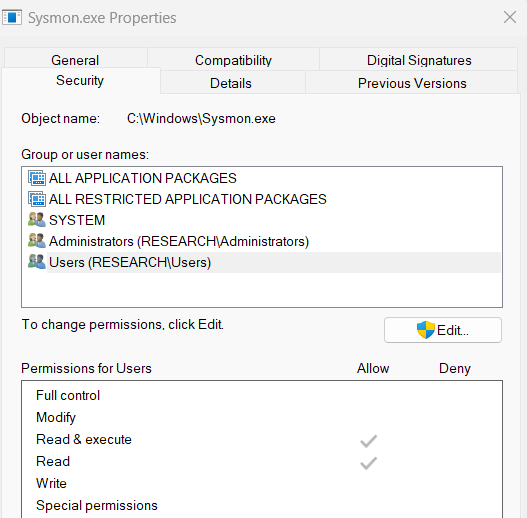 This service is not vulnerable.
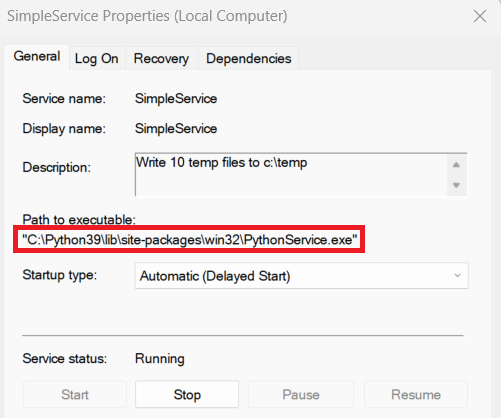
Now let’s look at another example: this time, we’ve written a basic Windows service in Python (which writes random text files into c:\temp), named “SimpleService”.
 This service is running as “Local System” (i.e.: high-level privileges). Once the service is installed, the executable file is stored in the following path: C:\Python39\lib\site-packages\win32\PythonService.exe.
 Viewing the security permissions on that file, we notice that “Authenticated Users” have the permission to modify the file –
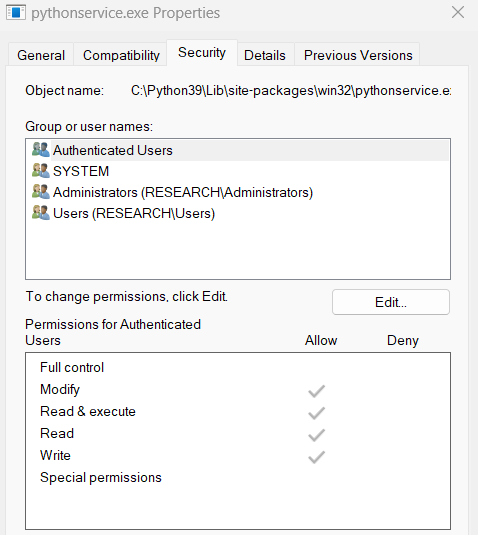 That means that any authenticated user in the domain can replace the file with a malicious one with the same name.
By automating the above, Red-Teamers can search for vulnerable services.
That means that any authenticated user in the domain can replace the file with a malicious one with the same name.
By automating the above, Red-Teamers can search for vulnerable services.
Note that while the service is running, the Service Control Manager (SCM) locks the service executable file, making it difficult to manipulate. However, skilled attackers may attempt to replace the executable by exploiting specific conditions or using more advanced techniques.
Hunting for Insecure Service Executable Permissions
Now let’s put our Blue-Team hat on, and approach this as defenders. Commercial Vulnerability Assessment products have the ability to scan and identify insecure service executable permissions; for instance, Tenable.sc has one such a plugin.
As a side note, I should mention, that even if you manually change the ACLs on the vulnerable service executable file (such as by disabling inheritance permissions and assigning ACE permissions directly), but do not change the ACLs stemming from its folder (or some parent folder above it) – the plugin will still fire and warn you about having an insecure windows service
But not all organizations necessarily have the budget or the means to implement such a solution. How can open source tools help us hunt these misconfigurations?
Powershell
Amongst my tools, I have written a Powershell script (named Find-Service-Insecure-ACL-Permissions.ps1) which can receives a list of hosts (either from a csv file or by querying Active Directory), and for each host (and in parallel, using Powershell Runspaces) – enumerates the list of services it has; for each service, it checks the ACL on the service executable to see who has the ability to modify it (that is not “NT AUTHORITY\SYSTEM”, “BUILTIN\Administrators” or “NT SERVICE\TrustedInstaller”), and collects all relevant data on the service, the executable and its ACL.
Finally, the data is displayed to the user in a Powershell OutGrid-View, and is also exported to a csv file for further analysis.
Velociraptor
I have written a Velociraptor Artifact which, for the most part, does the same thing the Powershell script does; one can use it for a wide-scale hunt, if Velociraptor is installed on hosts in the organization.

Conclusion
The battle between Red and Blue Teams is an ongoing one; in my case, it turned out that 4% of endpoints could be exploited using the above technique. Getting informed about attack techniques is essential for both sides. By acquiring visibility into “vulnerable dark areas”, Blue Teams can assess, mitigate and event prevent future dark areas from being created. Notice I used the word “acquire”, rather than “purchase” – because many times, open-source tooling is enough to get a bang for our (free) buck.